
 These images should have been posted, Monday, November 16th. More texture images.. iPhone 6. Left image saved as "quick fix" in PSE 11. Right image used posterize edges filter. Converted to B&W - darkened to make lines more distnct.
These images should have been posted, Monday, November 16th. More texture images.. iPhone 6. Left image saved as "quick fix" in PSE 11. Right image used posterize edges filter. Converted to B&W - darkened to make lines more distnct.
These images should have been posted, Monday, November 16th. More texture images.. iPhone 6. Left image saved as "quick fix" in PSE 11. Right image used posterize edges filter. Converted to B&W - darkened to make lines more distnct.

 These images should have been posted Sun, Nov. 8th, 2015.
 This should have been posted Fri., Oct. 30th. Have been looking for some nice yellow leaves that do not have a lot of brown in them. I am not sure if this is hicory or beech leaves. The were up quite a distance in the tree and I liked the sun highlighting the ones more in front. I know I used digital zoom. So, it may look like there is digital noise. Digital zoom usually causes pixilation. Post processing: the image on the left had highlights increased, slight midtone decrease, and slight sharpening. I know some people will not like that there is not enough border around the leaves. Unfortunately this is not always something you can see well on the LED screen with bright sun. I admit I did not zoom in to check it.to review image. The right image I used the image on the left and then applied the "Fresco" filter inPSE 11 which increased the outline of the edge with black.

 Found some acorns and oak leaves on my walk around the block last week. Acorns can have different sizes and shapes. I do not know one oak tree from another and last week I did post an image with the bur oak branch and acorns. These acorns are small and have points on the bottom. They were not very shiny either. The Native Americans and Pioneers used these ground as food source like flour.
 This fall I have been trying to capture pictures of different grasses Not an easy task when they seem to be blowing in the wind. This grass poofs out as it matures. This one was in my neighbor's yard. I tried to capture some of the fronds as part of framing the single focus. Too bad a cloudy day as it would have looked better with a Carolina blue sky. Then, I decided to go with the altered art mode and do an invert filter of that image.. I did sharpen it to the max to get more texture. Camera+ Edited in PSE 11
 My white ornamental Ginger Lily just started to bloom (9/24/15). I have been trying for days to get a good image but it has been raining for 3 days and windy. So, I am going with the best capture I could get. I shot these with native camera app for the iPhone 6. I did try to adjust exposure because of white blossoms. The image on the left was edited normally in PSE 11. The image on the right I wanted to try for an altered art effect. I cropped to a more square image and used the lighten/darken sliders, sharpened to the max to show more texture in the petals and give a more painterly appearance. I did not clone out the rain drops. As a result of the super sharpening the grass in the foreground and background became more pixelated. Too bad photography does not allow you to pass on the fragrance of these blossoms.
 These images should have been posted Sun., Sept. 13th. This is part of a sculpture for Endowment of the Arts that was done in conjunction with the 2015 Folk Festival in Greensboro, NC. The scculpture itself contains over 500 ladders donated by 300 people. Since there were a lot of people looking at the sculpture at ground level I decided to shoot for a design in the sky with the intention that I would play with filters and see what altered art or patterns I could use with these images. The original image on the left is unedited. It is a downsized file for the web so you will see some pixelization which can happen with lines. It was shot in HDR native 5C iPhone. The right image was maximizing shadows, highlights, midtones in PSE 11, and then applied the Saturatured Film effect x 4. Sharpening would have pixelated this image further. I do plan to work with the original iPhone image before reduciing the file size for the web. Plan to try more filters in various photo apps. Tomorrow for the next images I post you will see B & W and and the negative (invert) of the same which reminds me of infrared.

 One of my favorite trees in spring through fall is the Goldenrain Tree (Koelreuteria paniculata). It is native to Eastern Asia, China, & Korea. As I was walking on the paved asphalt path @ GSO Arboretum, I looked down to see the petals that had fallen to the ground -- as you can see a nice golden color in the image on the left. Unfortunately I did not think to take a closer image as I was thinking of this as a background when I get into digital imaging.. In another month there will be wonderful seed pods to photograph close up. I decided to do some altered art with this image because of the textures. The image on the left I darkened and increased the contrast and sharpened. The image on the right I wanted a more altered art effect. So, I increased the highlights and midtones, sharpened to the max, then applied red color variation x2. Taken in Camera + HDR mode. I elected not to crop the image. This might be one to try to change to square , choose a filters and send in Instagram. For more info, "Google" wikipedia.
 This image should have been posted for 8/12/15. I was walking in the neighborhood last night and came across this twisted piece of cedar limbs without any leaves. You could call this "Patterns of Nature". I did not like the oiriginal because I took it late evening in color HDR and it had blue cast in the highlights. Native camera. The image on L I played with sharpness, conversion to black and white and increasing contrast/darkness.to make the texture of the limbs show up better.using PSE 11. I also played with glow color filter in PSE 11 to get the effect in the right image. It gives an eerie effect. Played with the sliders to get the effect I liked.
 Today I went to the Yanceyville Farmer's Curb Market. One of the vendors was selling small succulent plants. I have always liked the texture or structure of the leaves of this "Hen & Chick"** plant. I chose a cultivar with pink tones to the outer leaves. The vendor said it will grow rapidly if I plant in a bigger pot with sandy soil. I only wanted to capture the center. Used square mode in Native Camera app with HDR. Minimal editing in PSE 11. Right image I decided to try for an altered image with the posterize filter which is my of my favorites. I am sure I will be taking more images as this plant grows. It is supposed to winter over. However, succulents are great container plants. It could be brought inside to enjoy in the winter.


 I was out late last evening and saw the shape of these prong shaped Dusty Miller (Senecio cineraria) leaves. Normally these leaves have a soft almost suede-like texture. It was so late and did not change WB in Camera+ app...so, it had a blue cast, and probably a lot of digital noise which cannot always be seen on the LED screen. It looks like something ethereal. I did not do much editing in PSE 11 other than increasing midtones, contrast, & a little sharpening. The image on the right I decided to go for a more altered art or background look. I choose saturated film filter maybe 4 times, then the posterize filter.
 Another texture find. This time I found a crosswalk that the white paint had cracked. I took it close up but do not remember if I used macro setting. The image on the left is the original with some increase in shadow & midtones plus sharpening. The image on the right I chose the sketch filter in PSE 11 and selected "stamp" which inverted the colors. If I had selected another color in the color palatte it would have selected that for the white in the default. Orange gave me ideas for halloween background. I also played around with the paint bucket trying to fill in various colors. So many opportunities to use this in digital art images abound. .
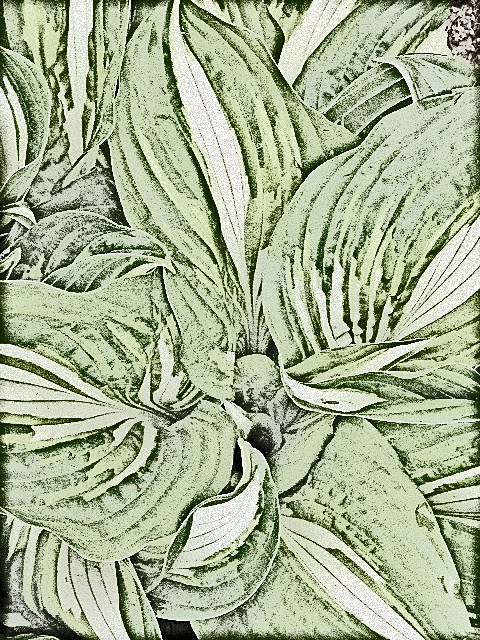 My hosta plants are beginning to leaf out and I love the designs at this stage before the slugs or insects decide to have a picnic. The image on the left is the original with minimal sharpening. It was taken on an overcast day. Decided to see what kind of texture I could get with PSE 11.For the image on the left I selected Line Drawing filter, Then tried to change opacity with some color.amd it increased the thickness of the lines. It has the highlights increased to max. I like the textured appearance. I wonder how it might look as a black and white image?
 As a child I loved kaliedoscopes. Today I took a picture of some silk flowers with my iPad mini that is similar to my iPhone 5s. I sharpened the image and adjusted highlights, shadows, & midtones in PSE 11. I decided to use an app called MegaPhoto. I had the free version first but it had pop up menus and so for extra money got rid of those and got more filters (about 250). The flowers were a cluster in a vase and I took the shot looking down from the top using incandescent lighting. **Note: If you take an original shot within the app and then apply the filter you will lose the original. You can use an image from your library. You have to know this info when using photo apps. When you like the arrangement of the kaliedoscope then you take a picture. I selected 2 different versions of the kaleidoscope effect. I want to try this with a purple hyacinth I took a few weeks ago. I used to be able to use a Kaleidoscope filter within Corel Paint Shop Pro image editing software.

 I saw this Santolina in the GSO Historical Museum Garden yesterday afternoon, Feb 14th. The foliage was actually a green grey color and the plant about 10-12 inches high --about the only green herbaceous plant. Today it has probably met it's demise since our temperatures were in the single digits last night. I took the image because of it's texture with plans to change using filters, etc. The grey green one is the original image to compare with no editing. I decided to play in Pixlr.com online editing app. (the free one) but I do have the mobile one on my iPhone. I cropped the photo and sharpened, then I chose posterize, and played with the hue and saturation sliders. l did not see the seed pods (upper right corner) when I took this image but not too distracting. In the summertime this plant has yellow flowers and the foliage can give texture and color to your garden.
 I love looking for textures. I thought the original image was just too blah. I liked the patterns and texture of the branches that had a plain wall on the building behind it. I guess this is more "creations of nature". I changed the color to red in MegaPhoto app, I played with numerous fillters and effects in PSE 11. That is not a moon but some highlights from some object behind me. The final effect I called "fake snow" because i played with highlights and then brightness & contrast to almost look like there is some snow on some of the branches/leaves. I have no idea how I might use this?? Perhaps enter in an altered art photograph contest.


